When a member wants to leave, the usual choice is to stop their membership at the end of the month or year they've paid for. They won't be charged again, they can keep booking until their last day, and you keep what they've paid. Nothing is refunded unless you choose to refund a payment, which is a separate step.
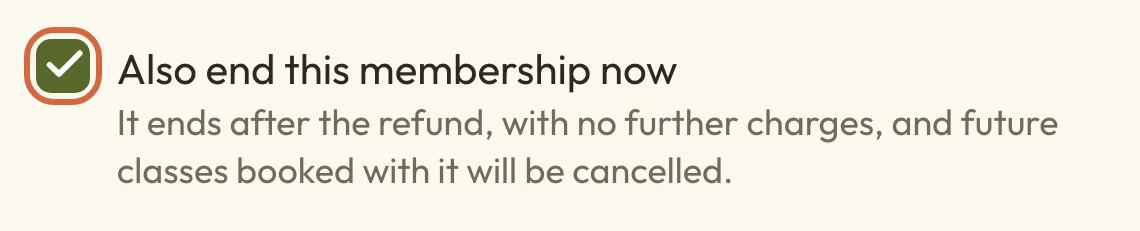
There's one thing to watch when you give money back. If you refund everything that's left on a payment, Also end this membership now is ticked for you, so untick it if your member is staying.
What each choice does to payments, access and money
All three choices are on the membership's menu, and nothing changes until you confirm.
- End when this period finishes stops future payments. They can keep booking until their last day, and you keep the money they've paid.
- End now stops future payments and ends their access today. You keep the money they've paid, unless you refund a payment as well.
- Payments and refunds gives back some or all of one payment. Refunding everything that's left on a payment ends the membership too unless you untick the box. Refunding less than that leaves it running unless you tick it.
Where to find these choices
- Go to BookingsPeople, open the person and choose Purchases.
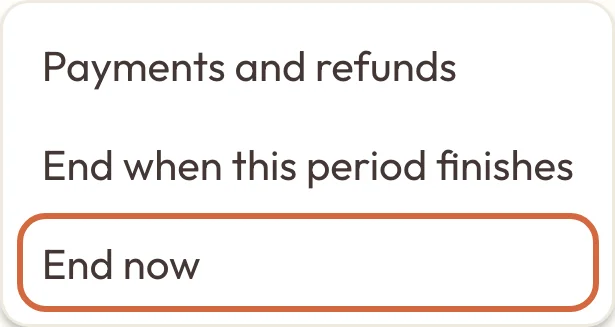
- Under Memberships, open the ⋯ menu next to the one you want.
You can also start from BookingsPasses, packages & memberships. Choose Who has them, then Memberships, and choose the person's row to open their page.
 (opens the full-size picture in a new tab)
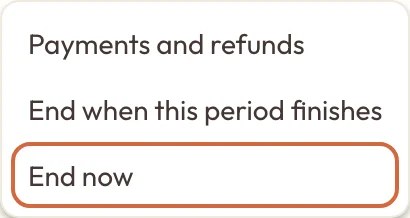 (opens the full-size picture in a new tab)Everything you can do with a membership is on this menu.
Cancel someone's membership
To cancel someone's membership at the end of the month or year they've paid for, open its menu and choose End when this period finishes. The confirmation tells you their last day. Choose End when this period finishes again to go ahead, or Keep membership to leave it as it is.
Their membership won't renew and they won't be charged again. On their Purchases page it now shows Ends and their last day. Nothing is refunded.
Any classes they've booked with the membership for after their last day are cancelled as soon as you confirm, as the section on booked classes explains.
Change your mind about a cancellation
Until their last day, you can undo a cancellation. Open the membership's menu, choose Keep it renewing, then Keep it renewing again to confirm. It'll renew on the usual date and they'll be charged as normal.
Classes that were cancelled when it was set to end stay cancelled, so they'll need to book those again. They aren't emailed to say the membership is carrying on, so it's worth telling them yourself.
Once the last day has passed the membership can't be restarted, but they can join again on your booking page.
End a membership now
To end a client's membership now, rather than at the end of their month, open its menu and choose End now, then End now again to confirm. The membership ends today and they won't be charged again. You can do this to a membership that's already set to end, too.
Ending a membership doesn't refund anything. If you'd like to give money back as well, refund the payment instead and leave Also end this membership now ticked, which does both in one go.
Refund a membership payment
- Open the membership's menu and choose Payments and refunds.
- Under Payment, choose the one to refund. Each month or year is a separate payment, so to refund two you'd do them one at a time.
- Check the Amount to refund, which starts at everything that's left on that payment. Change it to give back less. Macadamia doesn't work out the unused part of a month for you, so the figure is up to you.
- Check Also end this membership now, which is ticked when the amount is everything that's left and unticked for less.
- Add a Reason if you like. It's included in the email your member gets.
- Choose the button, such as Refund £40.00.
A card payment goes back to the card they paid with. If you've turned on Allow site-credit refunds, Refund to also lets you choose Site credit (Choose how customers pay explains the setting).
Their bank will usually take around 5 to 10 working days to show a card refund. Cancel or refund a booking explains what it costs you.
Refund a payment and keep the membership going
Refunding a membership payment will cancel their membership if Also end this membership now is ticked. It's ticked for you whenever the amount is everything that's left on the payment, so if you've already refunded £10 of a £40 payment, refunding the other £30 ticks it too. To refund a member who's staying, untick the box before you choose the refund button. The line under it changes to say the membership stays active, regular payments continue and existing classes stay booked.
The box goes back to its usual setting each time you change the amount, so make it the last thing you check.
 (opens the full-size picture in a new tab)
 (opens the full-size picture in a new tab)Refunding everything that's left on a payment ticks this box for you. Untick it if they're staying.
If you leave it ticked, the membership ends once the refund has gone through, in the same way as End now.
Refund a membership that has already ended
You can still refund a payment after a membership has ended, because Payments and refunds stays on its menu. You might see a message saying the membership has already ended when the refund finishes. That's only about the ending, and your refund has still gone through.
Refund a membership paid for in cash or by bank transfer
If they paid you directly, by cash, bank transfer or card machine, Macadamia can't send the money back for you. Give it back to them first, then follow the same steps as any other refund. Refund to shows Record a refund, which notes it so your figures match what you've given back.
Your member is still emailed about the refund, so it's best to have returned the money before you record it.
A membership you gave away for free has no payment to refund, so there's nothing to choose under Payment.
What happens to classes they've booked with the membership
When a membership ends, any classes they booked with it that fall after the end are cancelled. If you choose End when this period finishes, that happens as soon as you confirm, not on their last day. Their places are freed up for other people straight away.
- Classes they paid for another way, such as by card or with a pass, aren't touched.
- Classes that have already started or finished stay on their record.
- A course they booked as a whole with the membership is cancelled if any of its remaining sessions fall after the end, though sessions they've already been to stay on their record.
The email about the membership doesn't list which classes were cancelled, so you might like to tell them.
Does your member get an email?
Yes, your member is emailed about most changes:
- End when this period finishes sends an email saying the membership is ending, with their last day. There's no second email when that day arrives.
- End now sends an email saying the membership has ended.
- A refund sends an email with the amount and any reason you gave. It also says whether their membership is carrying on or has ended.
- A refund that also ends the membership sends both the refund email and the one saying it has ended.
Keep it renewing doesn't send an email. You can change the wording of these emails in SettingsEmails, under When a membership is set to end, When a membership ends and Refund for a membership payment.
If a member cancels for themselves
Members who joined online can cancel without asking you. Under Your bookings on your booking page, they choose Cancel membership, then Yes, cancel it. It works the same way as End when this period finishes, and they can undo it with Keep my membership until their last day.
To see who's leaving, go to Who has them in BookingsPasses, packages & memberships and choose Memberships. A member who has cancelled shows Ends and a date.
Memberships you added yourself
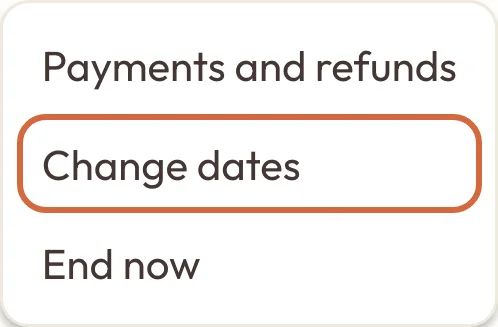
A membership you added by hand doesn't renew and isn't charged to a card. It shows Ends and its last day, and it stops by itself on that day. Its menu has Change dates and End now, but not End when this period finishes, and your client can't cancel it from their account.
 (opens the full-size picture in a new tab)
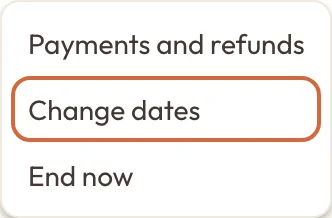 (opens the full-size picture in a new tab)A membership you added has Change dates on its menu.
To correct its dates, choose Change dates, set the First day and Last day, then choose Save dates. Classes still to come that fall outside the new dates are cancelled, including a course they booked as a whole if any of its sessions fall outside them. Classes they've already been to aren't touched. They're emailed the new dates.
If ending or changing a membership doesn't finish
Sometimes a booking can't be cancelled or the email can't be sent straight away. The membership then says the update isn't finished, and its menu has Finish membership update. Choose it to try again, or leave it and the update will finish automatically. Trying again won't send the email twice.
If you see a message saying the refund went through but the membership couldn't be ended, don't refund again. Choose End now on the membership's menu instead.
If a message says online payments aren't connected, you'll need to set up online payments again before you can change a membership that renews.